article number
711063

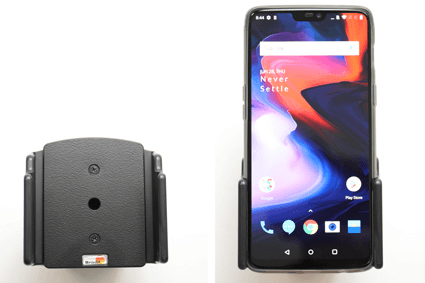
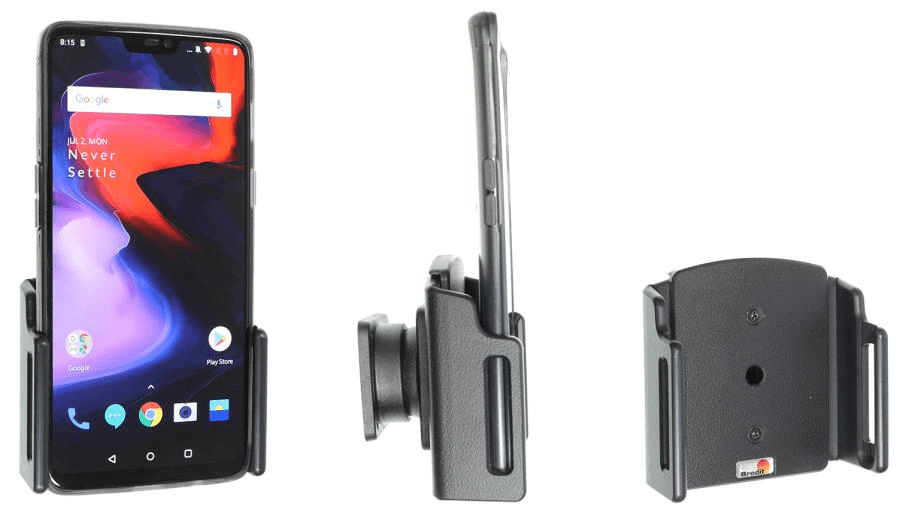
Brodit holder OnePlus 6/ 6T/ 7 with original skin

€29.95
In stock
-
+
Brodit houder OnePlus 6 met skin
  • Fast Shipping
  • High Quality Products
  • Secure Payments
Details
Keep your phone in a passive holder while on the road and you will always have it within easy sight and reach. Safe, comfortable and convenient!
 
This adjustable holder fits for devices with the original skin, that is included when you buy the device. It also fits for devices with a skin with the following dimensions: Width: 70-83 mm, Thickness: 2-10 mm. Before using the holder you set the holder's width so it suits your device, then your phone is held firmly in place in an upright position for maximum cellular reception. The holder has a neat and discreet design which blends well with the vehicle's interior.  You can connect e.g. a portable handsfree or a charging cable to the device when it is in place in the holder.
 
The holder is equipped with a tilt swivel so you can easily adjust the angle for better viewing, or switch between portrait and landscape mode. Tilts 17° and swivels 360°. Mounting plate 42x50 mm with AMPS-holes. Made of high grade black ABS/Acetal plastic. Made in Sweden. Attach onto ProClip Mounting Platform.
More Information
More Information
Accessory brand Brodit
Barcode 7320287110630
Recommended retail price incl. VAT €29.95
Holder feature Toestelspecifiek, Verstelbaar
Device with or without case with skin
Device holder width / height - -
Holder depth / thickness 7-24 mm
Cable / Qi / charger type / connnector passive
Input Voltage does not apply
Voltage (output) does not apply
Max Amperage not applicable
Montage standaard AMPS
Device holder lockable? no
Color black
Productinfo Professional holder with swivel mechanism for your smartdevice. Adjusting holder angle deminishes annoying screen reflection
Product installation Mount the holder on a ProClip in your vehicle. A detailed installation manual is included in the product packaging
Product suitable for In the Compatibility tab, check whether your smartdevice is suitable or listed for this holder
Item Returns This item can be returned
Show more + Show less -
Compatibility
Show more + Show less -
Instruction
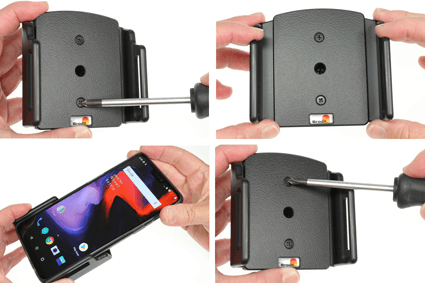
Please read all of the instructions and look at the pictures before attaching the holder.

1. To adjust the holder for your device: Loosen the upper and lower screw on the front side of the holder, so the sides of the holders can be adjusted. Place the device in the holder and press the sides together so the device is firmly in place. Tighten the screws on the front side of the holder.
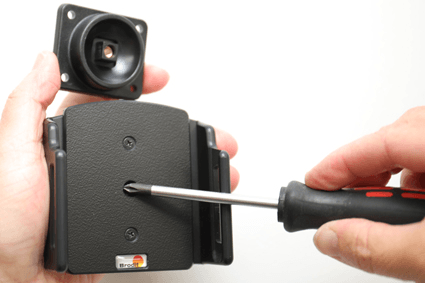
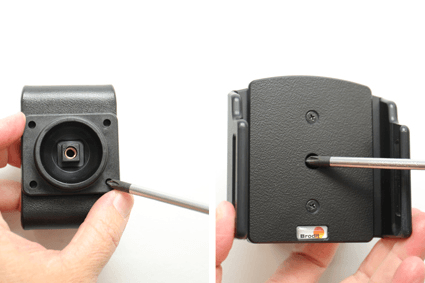
2.To install the holder: Loosen the screw in the center of the holder so you can remove the tilt swivel attaching plate on the back. Place the attaching plate onto the desired position. Screw the attaching plate into place with the enclosed screws.

3. Place the holder over the attaching plate so the screw fits in the hole in the tilt swivel. Tighten the screw so the holder is firmly in place, but still can be adjusted.

4. The holder is in place.

Scroll to top